Understanding the Workflow with OSM tools
Login to OSM portal
To be able to use all the tools required in the development cycle, you need to be authenticated in ETSI portal.
Go to OSM portal: https://osm.etsi.org/
Log in using your username and password
Note:
If you are contributing on behalf of your company, you should login with your ETSI Online Account (EOL).
If your company is not yet an OSM Member or Participant, you can check here how to join OSM as an organization
If your company has already joined OSM but you do not have an EOL account yet, you can request an EOL account
If you are an individual contributor, you can create your OSM account online.
If you need any help, contact us at OSMsupport@etsi.org
Reporting a bug on Bugzilla
Go to the OSM Portal and click on Bugzilla menu on the portal menu bar. Or simply go to OSM Bugzilla
Click on “new” on Bugzilla menu bar.
Choose the product, e.g. “OSM”.
Complete the bug form. If you know, choose the component, e.g. UI, SO, RO, Documentation/Wiki, etc.
Enter the bug summary, description, attachment, etc.
Click on the “Submit Bug” button to confirm.
A bug id is generated (e.g. Bug 6 -Small Error)
For the contribution workflow — setting up your environment, making changes, running CI, code review — see Contributing Code.
Proposing a new Feature
Project Features go trough a discussion and approval process. To propose a new Feature, OSM uses Gitlab.
Go to https://osm.etsi.org/gitlab/osm/features/-/issues/new. You need to be authenticated.
Create a new Issue for your feature
Title: A high level description of your feature (see some other examples in Gitlab)
Type: Issue
Description: The feature description, following the auto-generated template.
A feature request is about functionality, not about implementation (that is the design)
Describe WHAT you are proposing, and WHY it is important.
DO NOT describe HOW to do it.
Pick Labels If you foresee the OSM modules that might be affected by the feature, pick labels for them. Otherwise, leave it empty.
PLEASE: Do not set the following:
EPIC
Asignee
Milestone
Weight
Due Date
Submit Issue
Interact with the TSC and the Community through the issue. TSC will review your Feature. If it makes sense and its purpose is clear, it will be approved. Otherwise, TSC will provide questions for clarification.
Funnel of a feature
Once approved, the feature could transition through the following steps
Aproved: Approved by TSC to be included in OSM
Design: In the design phase, where HOW do to it will be discussed
Development: It is being implemented
Testing: Developer is testing it
Review: Community s reviewing it
Completed: It is completed, and merged
Abandoned: It was abandoned
An approved features is not a guarantee for implementation. Implementing a feature requires resources, and resources come from the companies integrating the Community, which might have prioritized the development of other features instead base on their own interests and the interests expressed by the EUAG and the TSC.
Once a Feature is accepted for inclusion in a specific Release, the ticket will be included in the respective EPIC
Release 1
…
Release 10
Release 11
…
For instance, to see Features included in Release11, check EPIC Release11
Designing a feature
Once a feature has been approved, the design phase starts. A design pad can be created in ETSI etherpad. The name of the pad must be “featureXXXX” where XXXX is the number of change in Gitlab. Once created, it is good practice to add the link as a comment to the feature in Gitlab.
For writing the design, you can check one of the previous designs, e.g. feature 10593, or use the design template below.
# XXXX FEATURE NAME

## CLARIFICATIONS TO EXPECTED E2E BEHAVIOUR

...

## REFERENCES

...

## ASSUMPTIONS

...

## IMPACTED MODULES

List of impacted modules: IM, RO, LCM, NBI, N2VC, common, MON, POL, NG-UI, osmclient, etc.

## MODULE1 IMPACT

...

## MODULE2 IMPACT

...

## TESTING

...
The design is expected to be socialized with the relevant stakeholders (e.g. MDLs and TSC). Dedicated slots can be allocated in the TECH calls on a per-request basis.
OSM CI/CD
The OSM CI/CD pipeline is split into two stages:
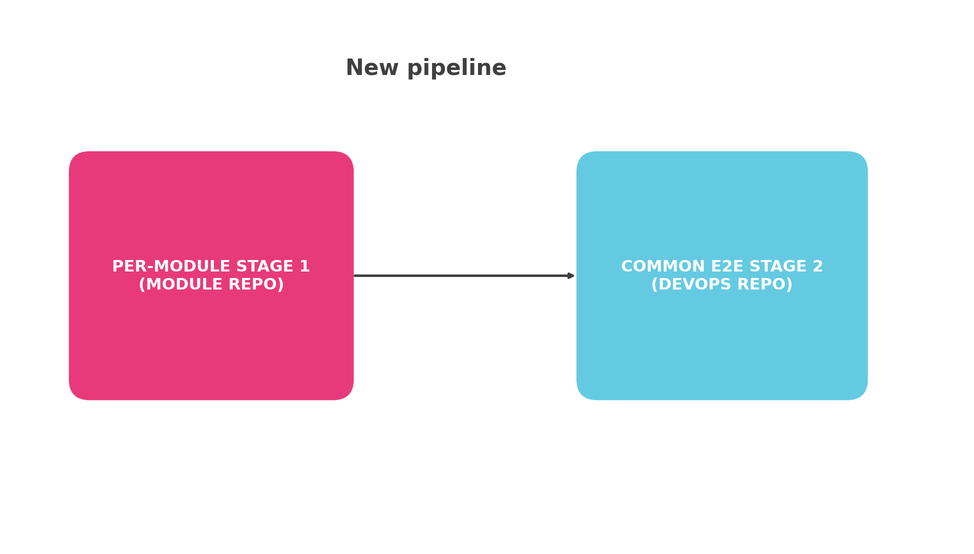
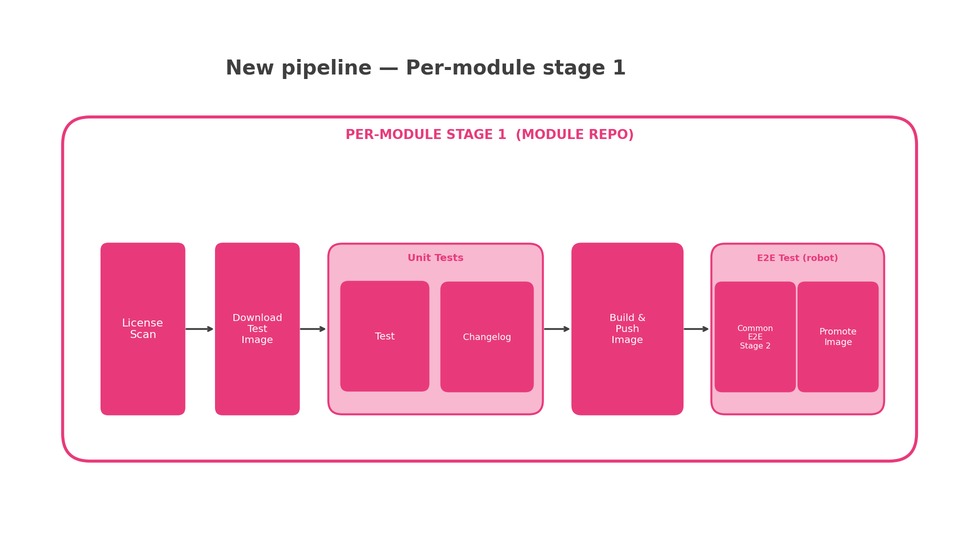
Stage 1 — Per-module runs inside each module’s own repository and covers license scanning, unit testing, building and pushing the container image, and a lightweight E2E smoke test:
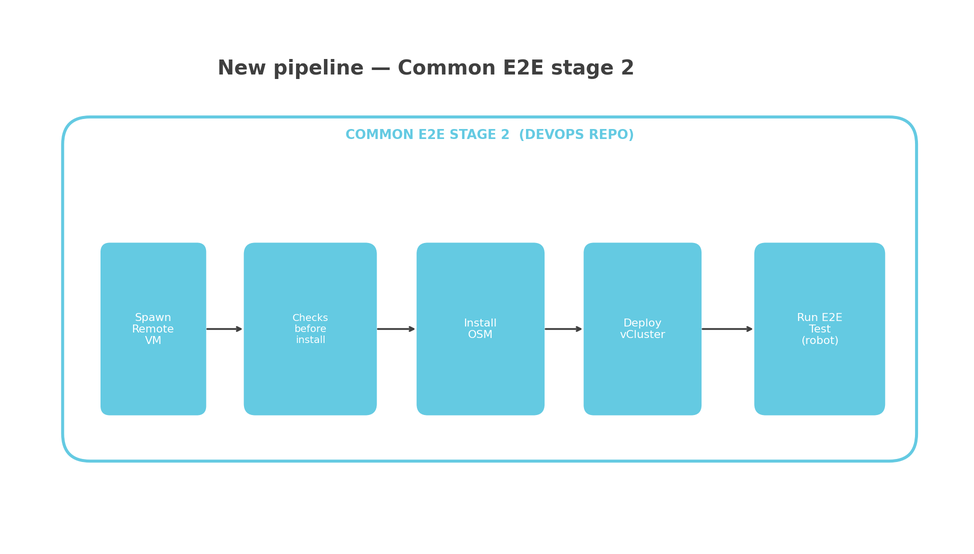
Stage 2 — Common E2E runs inside the devops repository, spins up a remote VM, installs OSM, deploys a vCluster, and executes the full E2E robot test suite:
Join the Community
Join the OSM Community Slack Workspace
Subscribe the OSM TECH mailing list
Get your organisation / project listed in the OSM Ecosystem